Was IT-Teams wissen müssen, bevor sie Spottune anschließen
Die Einführung eines Audiosystems im Einzelhandel ist nicht nur eine gute Entscheidung. Für viele Marken ist es auch eine IT-Entscheidung. Bevor ein neues Gerät in einem Geschäft angeschlossen wird, muss das IT-Team wissen, was es ist, warum es Netzwerkzugriff benötigt und wie es standortübergreifend sicher genehmigt werden kann. Das ist eine berechtigte Frage.
Spottune wurde für kommerzielle Umgebungen entwickelt, in denen IT-, Betriebs- und Markenteams zusammenarbeiten müssen, insbesondere wenn dasselbe Audio-Setup in vielen Geschäften ausgerollt wird. Dieser Artikel gibt IT-Teams einen klaren Überblick darüber, was sie vor dem Anschluss von Spottune Stream an das Netzwerk berücksichtigen sollten.
Was ist mit dem Netzwerk verbunden?
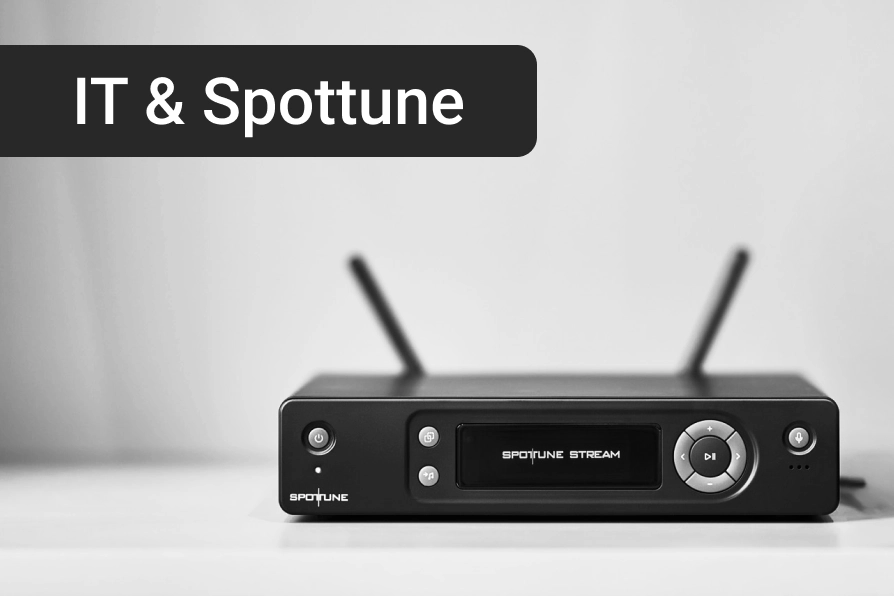
In einem Spottune-System ist das zentrale netzwerkverbundene Gerät der Spottune Stream. Der Stream ist der Sender. Er verarbeitet den Audio-Input, sendet Audio drahtlos an die Spottune-Lautsprecher und verbindet sich mit der Spottune Cloud, wenn Online-Management genutzt wird.
Die Lautsprecher selbst verbinden sich nicht mit dem Laden-WLAN. Audio wird vom Stream über eine dedizierte drahtlose Audioverbindung, basierend auf DECT-Technologie im Bereich von 1,8 bis 1,9 GHz, an die Lautsprecher gesendet. Dies hält das Audiosystem von überfüllten WLAN-Netzwerken in Einzelhandelsflächen getrennt. Für IT-Teams ist dies wichtig: Das Laden-WLAN überträgt kein Audio zwischen den Lautsprechern. Der Netzwerkzugriff ist hauptsächlich für den Stream, Cloud-Funktionen und das Online-Management relevant.
Warum benötigt Spottune Stream Netzwerkzugriff?
Spottune kann auf verschiedene Weisen genutzt werden. Für die lokale Audiowiedergabe kann der Stream Audio von Eingängen wie AUX, USB oder anderen unterstützten Quellen empfangen, ohne dass überhaupt eine Netzwerkverbindung erforderlich ist. Wenn der Stream mit dem Netzwerk verbunden ist, Spottune Cloud kann für Fernverwaltung und -steuerung genutzt werden. Die Cloud ist optional und kostenlos und bietet Marken- und Betriebsteams einen besseren Überblick über das Audio-Setup an allen Standorten, ohne dass sie physisch in jedem Geschäft anwesend sein müssen.
Typische Anwendungsfälle sind die Überprüfung des Systemstatus, die Verwaltung von Musik und Lautstärke an allen Standorten, das Festlegen von Zeitroutinen, die Remote-Unterstützung von Geschäften und die Gewährleistung eines konsistenten Audioerlebnisses in einem Einzelhandelsnetzwerk. Für größere Marken liegt hier oft der wahre Wert. Es geht nicht nur darum, Musik in einem Geschäft abzuspielen. Es geht darum, sicherzustellen, dass dasselbe Markenerlebnis an vielen Standorten verwaltet werden kann, nach demselben Prinzip, das Rains nutzt, um 48 Geschäfte von einem einzigen Dashboard aus zu betreiben.
Streams per MAC-Adresse vorab genehmigen
Eine der häufigsten IT-Fragen ist einfach: Welche Geräte benötigen Zugriff auf unser Netzwerk? Spottune kann dabei helfen, diese Frage vor der Installation zu beantworten. Wenn eine Marke eine Bestellung aufgibt, können die MAC-Adressen der relevanten Spottune Streams vor Beginn des Rollouts mit dem IT-Team geteilt werden, was es der IT ermöglicht, die Geräte im Voraus zu genehmigen.
Bei größeren Rollouts kann dies den Prozess reibungsloser gestalten. Anstatt Geräte Geschäft für Geschäft während der Installation zu genehmigen, kann die IT das Netzwerk vorbereiten, bevor die Ausrüstung vor Ort eintrifft. Dies ist besonders nützlich, wenn eine Marke Spottune in mehreren Geschäften einführt, jedes Geschäft strenge Netzwerkzugriffsregeln hat, nur genehmigte Geräte im Netzwerk zugelassen sind, das IT-Team Geräte-Sichtbarkeit vor der Installation wünscht oder der Installationspartner einen schnelleren Vor-Ort-Prozess benötigt. Dies hilft, Reibungen zwischen IT-Genehmigung und Ladeninstallation zu reduzieren und bietet der Marke einen klareren Prozess, bevor der Rollout beginnt.
Ein einfacher Prozess für die IT-Genehmigung
Ein typischer IT-Genehmigungsprozess umfasst fünf Schritte. Die Marke oder der Partner bestätigt den Umfang des Rollouts, einschließlich der Anzahl der Standorte und Streams. Spottune oder der Partner teilt Geräteinformationen mit den relevanten Stream-Details, einschließlich MAC-Adressen, die für das IT-Team vorbereitet wurden. Die IT genehmigt die Geräte vorab, indem sie die Streams gemäß der internen Netzwerkrichtlinie der Marke auf eine Whitelist setzt oder genehmigt. Die Installation erfolgt vor Ort, wobei der Installationspartner den Stream gemäß der vereinbarten Einrichtung anschließt. Und das System wird über die Spottune Cloud verwaltet, sobald es online ist, abhängig von der Cloud-Einrichtung und dem Benutzerzugriff.
Das ist eine praktische Möglichkeit, die IT unter Kontrolle zu halten und den Rollout dennoch effizient zu gestalten.
Was IT-Teams üblicherweise wissen möchten
Jede Organisation hat ihre eigenen Anforderungen, doch bei Einzelhandels-Rollouts stellen IT-Teams vor der Freigabe oft die gleichen Fragen.
Welches Gerät stellt eine Verbindung zum Netzwerk her? Der Spottune Stream.
Nutzen die Lautsprecher das Laden-WLAN? Nein. Der Stream sendet Audio drahtlos an die Lautsprecher mittels dedizierter DECT-basierter Audioübertragung.
Können die Geräte vor der Installation identifiziert werden? Ja. Die MAC-Adressen der Streams können vor der Installation mitgeteilt werden, sodass die IT sie vorab freigeben kann.
Wird Cloud benötigt? Nein. Spottune Cloud ist optional und kostenlos und wird für Fernverwaltung, Überwachung und Online-Steuerung genutzt, wenn eine Marke dies wünscht. Die Einrichtung kann nach den Bedürfnissen der Marke geplant werden.
Kann das System Rollouts an mehreren Standorten unterstützen? Ja. Spottune wurde für kommerzielle Umgebungen entwickelt, in denen Marken konsistentes Audio über mehrere Standorte hinweg benötigen, wie bei Bolia, Rains und River Island.
Wer sollte vor dem Rollout beteiligt werden? Für einen reibungslosen Ablauf beziehen Sie die IT, den Einzelhandelsbetrieb, den Installationspartner, das lokale Filialteam und den Spottune-Partner oder Projektansprechpartner ein. Wenn diese Teams vor der Installation aufeinander abgestimmt sind, können die meisten Probleme vermieden werden.
Warum das im Einzelhandel wichtig ist
Im Einzelhandel herrscht reger Betrieb. Installationen müssen oft außerhalb der Öffnungszeiten erfolgen. Filialteams verfügen möglicherweise nicht über technisches Wissen. IT-Teams sind möglicherweise nicht vor Ort. Partner benötigen klare Anweisungen, bevor sie eintreffen. Deshalb ist Vorbereitung so wichtig.
Für eine einzelne Filiale mag die Netzwerkfreigabe einfach sein. Für 20, 50 oder 200 Filialen wird es zu einem Rollout-Prozess. Wenn MAC-Adressen im Voraus verfügbar sind, haben IT-Teams eine praktische Möglichkeit zur Vorbereitung, der Installationspartner vermeidet Verzögerungen, und die Marke behält die Kontrolle darüber, was mit dem Netzwerk verbunden ist.
Ein besserer Audio-Rollout beginnt vor der Installation
Guter Klang ist Teil des Kundenerlebnisses. Doch für größere Einzelhandelsmarken ist eine gute Rollout-Planung ebenso wichtig. Spottune hilft, die Lücke zwischen Marke, Betrieb, IT und Installationspartnern zu schließen. Das System ist einfach zu installieren in der Filiale, aber es liefert IT-Teams auch die Informationen, die sie benötigen, bevor Geräte angeschlossen werden. Das erleichtert die Skalierung von Audio über mehrere Standorte hinweg, mit weniger Unsicherheiten und weniger Überraschungen am Installationstag.
Wenn Sie einen Rollout planen, können wir Ihnen die relevanten Stream-Informationen vor der Installation zur Verfügung stellen, einschließlich MAC-Adressen für die IT-Freigabe. Kontaktieren Sie Spottune oder Ihren autorisierten Spottune-Partner, um Ihr Projekt vorzubereiten.